HSTS Preload
When you type a website address into your browser’s URL bar, one of the first decisions it makes is whether to connect via http:// or https://.
HTTP sends data in plaintext. HTTPS wraps the connection in TLS, which encrypts the traffic so nobody in between can read or modify it, and lets the browser verify it’s talking to the real server.
Most sites accept http:// traffic on port 80 and immediately redirect it to https:// on port 443. That works, but the first request still goes out in plaintext.
The first hop
When you load the HTTP URL directly, the redirect flow looks like this:
  sequenceDiagram
    participant B as Browser
    participant S as Server

    B->>S: GET http://example.com
    S-->>B: 301 Redirect to https://example.com
    B->>S: GET https://example.com
    S-->>B: 200 OK
The redirect is fast, but anyone on the network path can see that first request. On a hostile network they can also rewrite the redirect and keep the browser on plaintext HTTP for the rest of the visit.
If your site is HTTPS-only anyway, the fix is to have the browser remember that and stop trying HTTP at all.
HSTS
HTTP Strict Transport Security, or HSTS, is a response header that tells the browser to always use HTTPS for your domain. Once the browser sees it on a valid HTTPS response, it caches the policy for max-age seconds.
After that, the request flow looks like this:
  sequenceDiagram
    participant B as Browser
    participant S as Server

    Note over B: HSTS policy already cached
    B->>S: GET https://example.com
    S-->>B: 200 OK
The browser now rewrites http:// links to your site before sending anything. In Chrome’s devtools this shows up as a 307 that transfers zero bytes, because the redirect happens inside the browser and never touches the network:
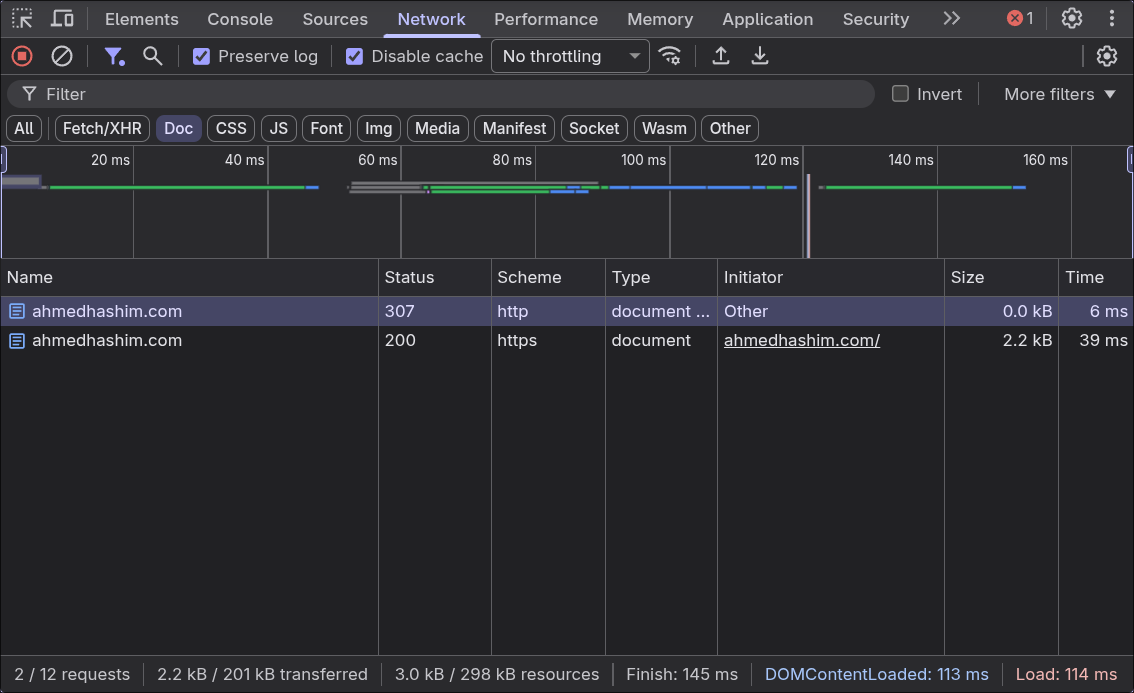
This makes downgrade attacks much harder, but only after the browser has seen your header once. The very first visit is still exposed.
Preload
HSTS preload fixes that. Chrome ships a built-in list of domains that are HTTPS-only, and the other major browsers base their lists on it. If your domain is on the list, the browser upgrades http://example.com to https://example.com before sending anything, so the first visit behaves like every visit after it.
The list only accepts domains whose header includes the includeSubDomains directive, which applies the policy to every subdomain as well. A preloaded example.com means blog.example.com and api.example.com are HTTPS-only from the first visit too.
These days preload matters less than it used to. Since version 115, Chrome tries HTTPS first for every navigation, even without HSTS. The difference is that Chrome falls back to HTTP if the HTTPS attempt fails, and an attacker who can block that attempt can force the fallback. A preloaded domain never falls back.
You should still turn on HSTS for every site. Save preload for domains you know will stay HTTPS-only for years.
Requirements
To get on the list, your site needs to:
- serve a valid TLS certificate
- redirect
HTTPtoHTTPSon the same host, if port80is open - serve all subdomains over
HTTPS - send the
HSTSheader from the base domain with amax-ageof at least one year, plusincludeSubDomainsandpreload
A valid header looks like this:
Strict-Transport-Security: max-age=31536000; includeSubDomains; preload
Once it’s live, submit your domain at hstspreload.org.
Two of the requirements are easy to miss:
- “All subdomains” really means all of them. That includes
wwwif it has a DNS record, and internal hosts that aren’t reachable from the internet. - If your
HTTPSsite redirects, like fromexample.comtowww.example.com, the redirect response needs theHSTSheader too.
I’d suggest not jumping straight to a year. Instead, ramp max-age up in stages, starting with a few minutes, and check that every subdomain works over HTTPS before moving to the preload value.
You can ask to be removed from the list later, but the change takes months to reach users’ browsers. Only submit a domain once you’re sure it and all of its subdomains can stay on HTTPS for good.